taskfiles

https://github.com/standardloop/taskfiles
My collection of re-usable Taskfiles
How to use
Enabling Remote Taskfiles
- https://taskfile.dev/docs/experiments/remote-taskfiles
- https://taskfile.dev/docs/experiments/#enabling-experiments
Your .taskrc
Your Taskfile
vars:
  STANDARDLOOP_TASKFILES_VERSION: "v0.0.6"

includes:
  color: https://raw.githubusercontent.com/standardloop/taskfiles/refs/tags/{{.STANDARDLOOP_TASKFILES_VERSION}}/color.yml
  rancher: https://raw.githubusercontent.com/standardloop/taskfiles/refs/tags/{{.STANDARDLOOP_TASKFILES_VERSION}}/rancher.yml
  colima: https://raw.githubusercontent.com/standardloop/taskfiles/refs/tags/{{.STANDARDLOOP_TASKFILES_VERSION}}/colima.yml
Color
This Taskfile is for sharing variables that allow for settings text color.
There is one task, but is just for testing that variables.
$ task --taskfile color.yml --list-all
task: Available tasks for this project:
* default:             (aliases: all)
* test:          Prints out all the colors avaiable.
$ task --taskfile color.yml
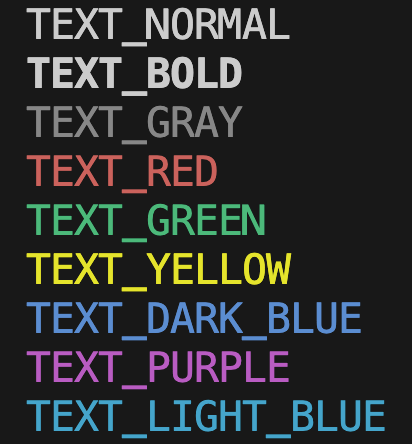
Using in your Taskfile
When you include this Taskfile you have access to all the color variables.
In general, you will use it like this:
{{.TEXT_YOUR_CHOICE_HERE}} your message here {{.TEXT_RESET}}
Example:
---
version: '3'

vars:
  STANDARDLOOP_TASKFILES_VERSION: "v0.0.6"

includes:
  color: https://raw.githubusercontent.com/standardloop/taskfiles/refs/tags/{{.STANDARDLOOP_TASKFILES_VERSION}}/color.yml

tasks:
  default:
    silent: true
    cmds:
      - echo "{{.TEXT_YELLOW}}waiting....{{.TEXT_RESET}}"
      - echo "{{.TEXT_GREEN}}DONE{{.TEXT_RESET}}"
Rancher
This Taskfile contains tasks for spinning up rancher docker engine.
Using in your Taskfile
Example:
---
version: '3'

vars:
  STANDARDLOOP_TASKFILES_VERSION: "v0.0.6"

includes:
  rancher: https://raw.githubusercontent.com/standardloop/taskfiles/refs/tags/{{.STANDARDLOOP_TASKFILES_VERSION}}/rancher.yml

env:
  DOCKER_ENGINE_CPUS: 4
  DOCKER_ENGINE_MEMORY: 8

tasks:
  default:
    silent: true
    cmds:
      - task: rancher:start
        vars:
          FLAGS: "--virtual-machine.number-cpus {{.DOCKER_ENGINE_CPUS}} --virtual-machine.memory-in-gb {{.DOCKER_ENGINE_MEMORY}}"
Running:
$ task
INFO[0000] About to launch /usr/bin/open -a /Applications/Rancher Desktop.app --args --application.startInBackground=true --virtualMachine.memoryInGB 8 --virtualMachine.numberCPUs 4 ...
Waiting for docker to come up...
Waiting for docker to come up...
Waiting for docker to come up...
Waiting for docker to come up...
Docker came up!

$ task clean
Shutting down.
Colima
This Taskfile contains tasks for spinning up colima docker engine.
Using in your Taskfile
Example:
---
version: '3'

vars:
  STANDARDLOOP_TASKFILES_VERSION: "v0.0.6"

includes:
  colima: https://raw.githubusercontent.com/standardloop/taskfiles/refs/tags/{{.STANDARDLOOP_TASKFILES_VERSION}}/colima.yml

env:
  DOCKER_ENGINE_CPUS: 4
  DOCKER_ENGINE_MEMORY: 8

tasks:
  default:
    silent: true
    cmds:
      - task: colima:start
        vars:
          FLAGS: "--network-address --cpu {{.DOCKER_ENGINE_CPUS}} --memory {{.DOCKER_ENGINE_MEMORY}}"
  clean:
    cmds:
      - task: colima:clean
Running:
$ task
INFO[0000] starting colima
INFO[0000] runtime: docker
INFO[0000] creating and starting ...                     context=vm
INFO[0020] provisioning ...                              context=docker
INFO[0021] starting ...                                  context=docker
INFO[0022] done

$ task clean
are you sure you want to delete colima and all settings? [y/N] INFO[0000] deleting colima
INFO[0000] deleting ...                                  context=docker
INFO[0000] done